Open beta — 14 clusters in production

The control panel
Proxmox was missing.

Unify clusters. Partition tenants into isolated VDCs. Automate PBS backups. Give teams self-service VM access — without touching the hypervisor directly.

2,847
Active VMs tracked
31ms
Avg API response
99.3%
Control plane uptime
virtualize.pro/vm?id=108&node=pve-eu-3
dns
dashboard
backup
group
prod-web-01 ID: 108 RUNNING
Ubuntu 24 LTS · pve-eu-3 · EU-West
Shutdown
Force Stop
CPU
23.7%
8 vCores
Memory
6.2 GB
Total: 8 GB
Disk
58.3%
58.3 / 100 GB
prod-web-01 — Proxmox noVNC Launch Console
Proxmox VE 8.3 — pve-eu-3
prod-web-01:~$
Snapshots
Backups
Reinstall
Mount ISO
backup
PBS backup complete
prod-web-01 · 2h ago · 4.1 GB
14
Clusters online
2,847
Active VMs
hubProxmox VE 7 & 8 backupProxmox Backup Server terminalnoVNC Console cloud_uploadCloud-init lanMulti-cluster API shieldRole-based Access Control publicIP Pool Management scheduleAutomated Backup Scheduling hubProxmox VE 7 & 8 backupProxmox Backup Server terminalnoVNC Console cloud_uploadCloud-init lanMulti-cluster API shieldRole-based Access Control publicIP Pool Management scheduleAutomated Backup Scheduling

One panel. Every cluster.
Any team size.

Managing Proxmox at scale is still a manual job — bouncing between node UIs, SSH sessions, and spreadsheets. Virtualize Pro closes that gap with a purpose-built control plane.

Connect every Proxmox node to one authenticated session.

Register multiple Proxmox clusters under a single API surface. Deploy VMs across data centers, move workloads between nodes, and monitor all resources without switching context or browser tabs.

  • check_circle Unified VM inventory across all clusters
  • check_circle Cross-cluster template deployment
  • check_circle Per-cluster API token isolation
  • check_circle Node health and resource tracking
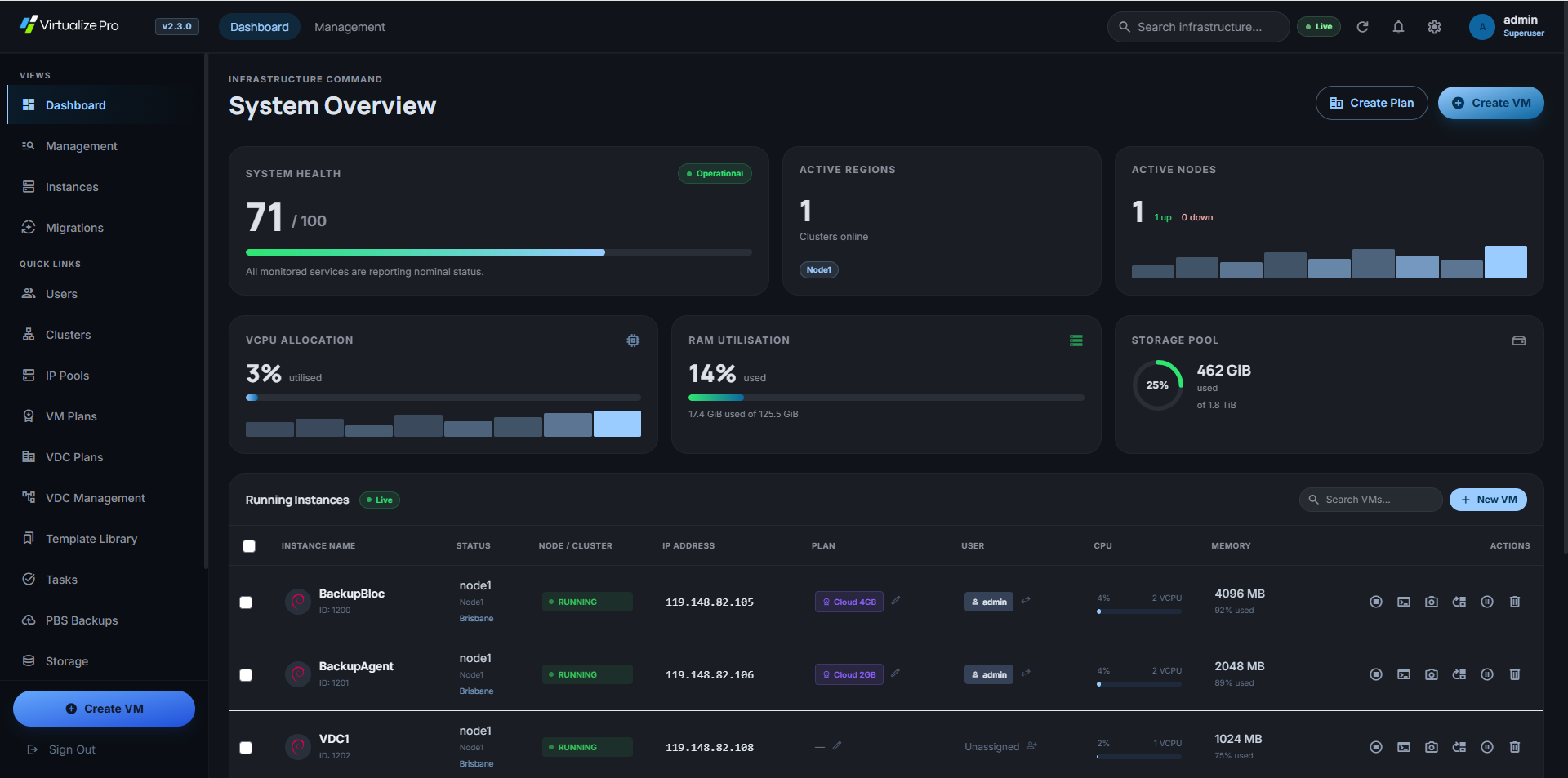
Virtualize Pro — Instances dashboard
Virtual Data Centers
3 active VDCs
+ New VDC
corporate_fare
Acme Corp
12 VMs · 8 vCores · 48 GB RAM
Active 4 users
code
DevTeam-Alpha
8 VMs · 16 vCores · 64 GB RAM
Active 2 users
science
Infra-QA
6 VMs · 6 vCores · 24 GB RAM
Active 3 users
Cluster resource utilization 63.4%

Isolated Virtual Data Centers per tenant.

Partition your Proxmox infrastructure into isolated VDCs. Each tenant gets dedicated resource quotas, their own IP pool, scoped billing, and a clean self-service interface — with zero cross-contamination between organizations.

  • check_circle CPU, RAM, storage quota enforcement
  • check_circle Dedicated IP pools per VDC
  • check_circle VDC owner self-service management
  • check_circle Three-tier RBAC: Admin → VDC Owner → User

PBS backups on a schedule you configure once.

Connect Proxmox Backup Server and set daily, weekly, or monthly backup windows per VM. Browse snapshot history, restore a point-in-time snapshot, or wipe old backups — all without a PBS CLI session.

  • check_circle Per-VM cron schedule with timezone support
  • check_circle One-click restore from any snapshot point
  • check_circle On-demand backup creation
  • check_circle Backup size and timestamp tracking
PBS Backup Manager
prod-web-01
Create Backup
schedule Automated Schedule
Active
Frequency
Daily
Time
02:30 UTC
Snapshot history
check_circle
2026-03-31 02:30 UTC
4.1 GB · ct/108/2026-03-31T02:30
Restore
check_circle
2026-03-30 02:30 UTC
3.9 GB · ct/108/2026-03-30T02:30
Restore
check_circle
2026-03-29 02:30 UTC
4.0 GB · ct/108/2026-03-29T02:30
Restore

Built for operators who ship infrastructure.

system_update_alt

Template-based deployment

Clone from curated OS templates in under 90 seconds. Cloud-init provisions hostname, SSH keys, and network on first boot.

Ubuntu 24 LTS
Debian 12
Rocky Linux 9
AlmaLinux 9
CentOS Stream
add Custom template
terminal

Browser console

Full noVNC interactive session opens in a new tab. No VPN, no SSH tunnel needed.

Ubuntu 24.04.2 LTS
prod-db-01 login: admin
admin@prod-db-01:~$
public

IP pool management

Define CIDR ranges, assign IPs to VMs on creation, and reclaim addresses automatically on deletion.

10.10.4.23 Assigned
10.10.4.24 Available
10.10.4.25 Assigned
key

SSH keys & passwords

Inject SSH public keys during reinstall. Reset the cloud-init password from the VM detail panel without a console session.

ssh-ed25519 AAAAC3NzaC1lZDI1NTE5AAAA
IBKgHnlX2qzrDP7Mmg3q... user@host
low_priority

Boot order control

Drag-and-drop boot device ordering from the browser. Enable or skip disks and network boot without the Proxmox node UI.

drag_handle scsi0 (disk)
drag_handle net0 (pxe)

People running it in production.

"We run three geographically separate Proxmox clusters for a mix of development and production tenants. Before this, onboarding a new team meant SSH sessions, manual IP spreadsheets, and two hours of configuration. Now it's a form and a button. Provisioning time dropped from 147 minutes to under 4."
Marcus Reinhardt
Head of Infrastructure · Helix Systems GmbH
"The PBS scheduling integration alone saved us from a compliance headache. Every VM gets a nightly backup, every restore is two clicks. It's infrastructure management that finally respects our time."
Priya Venkataraman
Platform Engineer · Orbital Cloud

Simple, transparent pricing

One flat monthly fee. Unlimited VMs, unlimited clusters. No per-node charges, no surprises.

All-Inclusive Plan

Everything included
$12 / month

Full access to every feature — connect as many clusters and manage as many VMs as you need.

  • check_circleUnlimited Proxmox clusters
  • check_circleUnlimited VMs & containers
  • check_circleUnlimited admin users
  • check_circleVDC multi-tenancy
  • check_circlePBS backup management
  • check_circleWHMCS integration
  • check_circlePriority email support
rocket_launch Start free trial chat Talk to us first

Try it free — no card required

Fill in the form below and we'll set up a trial account for you, typically within a few hours on business days.

calendar_month
14-day free trial
Full access to all features for 14 days. No credit card required — just connect your cluster and go.
dns
Unlimited clusters & VMs
Connect your full environment during the trial — no artificial VM or cluster caps.
support_agent
Hands-on onboarding
We'll help you get your first cluster connected and walk you through the panel personally if needed.
price_check
$12/month after trial
No lock-in. Cancel any time. Convert to a paid plan when you're ready — all data and settings transfer.

Have a question or ready to get started?

Send us a message and we'll get back to you within one business day. Whether you're evaluating the platform, need a custom quote, or just want a demo — we're happy to help.

mail
Email
support@virtualizepro.com
schedule
Response time
Within 1 business day

Start today

One panel for every
cluster you'll ever run.

Connect your first Proxmox cluster in minutes. No agent install required on the hypervisor nodes.

arrow_forward Connect your first cluster dashboard Go to dashboard